

Heard of a free SEO tool? Yes, there is a tool that is free of cost and doesn’t have any hidden charges. It’s SEOquake. Know what is SEOquake? Its features and its top alternatives to grow your business.
In this blog, I’ll guide you on how to use SEOquake, what its benefits and limitations are. Along with this, you will also learn how to download SEOquake and what the users are saying.
What is SEOquake?
It is a completely free SEO browser extension and works on every page you visit. SEOquake provides instant information related to any website, whether it is your website or your competitor’s website. It works on browsers like Firefox and Google Chrome.
SEOquake is a professional SEO tool that helps digital marketers, content writers, business owners, and SEO professionals. It is used to improve websites by increasing organic traffic and increasing sales.
The tool is best for people who want a quick analysis of the competitor’s website. It shows what is working for the website and what the required improvements are. The best part of this tool is that you don’t need to switch between different websites. The result is directly available once the extension is added. It is best for beginners or startups that don’t want to invest more money but want to see a practical solution.
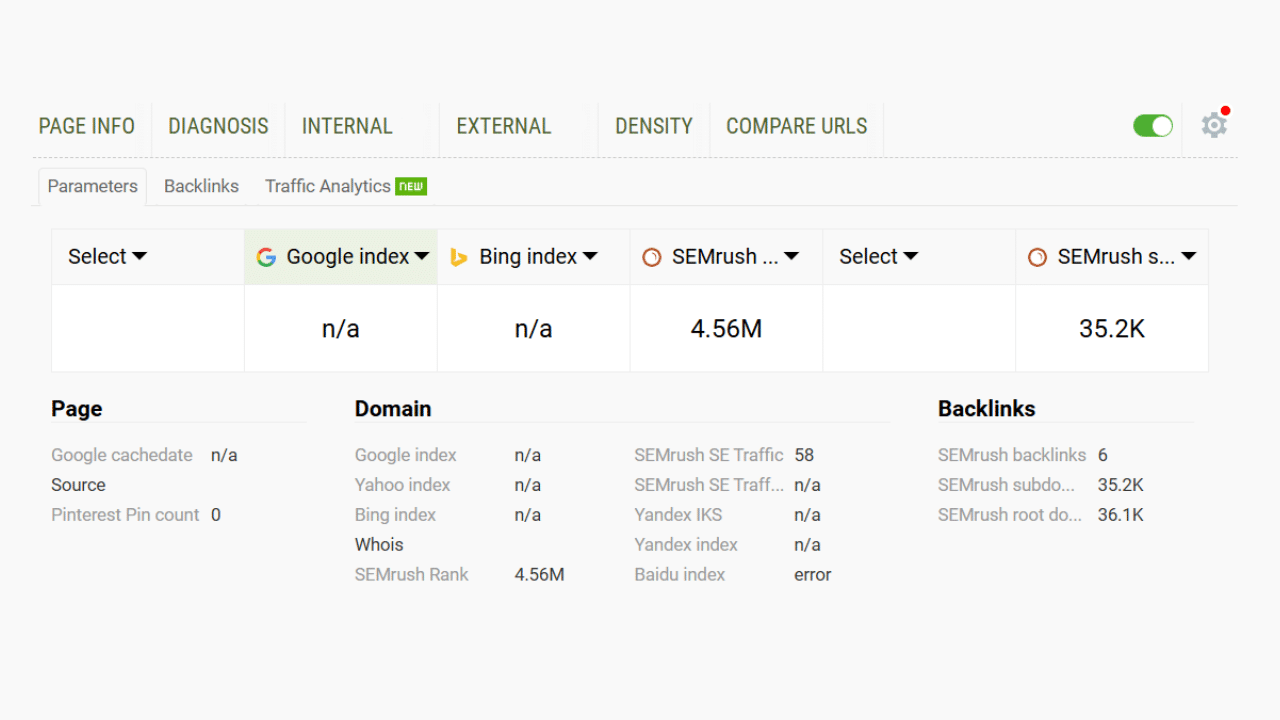
SEOquake comes with several features that can help you with the best SEO practises. You just need to add the extension to your browser, and it’s done. Now, you just need to click on the SEOquake extension from the right side of the display screen. Explore the details on what and how each feature helps:
SEOquake Features
SEOquake comes with many features. Let’s take a look at the features and how they work.
Page Info
Once you click on the SEOquake icon, the first feature that appears on the screen is page info. Under this, you can see the title, the meta description, and the number of internal and external links. Along with this, it also displays backlinks, traffic, and the best use of keywords for a particular page.
Diagnosis
This page helps you with a quick on-page SEO audit by analysing the page and scanning for common issues, which hinder the quality of any website. Instead of guessing the reason behind the underperformance of the website, run a quick check for errors and easy fixes.
Internal
This feature lists all the internal links present on the page, including anchor text and destination URLs. Internal linking plays a crucial role in SEO practice. The content team can do a quick cross-check on whether the link is properly placed or requires any adjustments.
External
Under this section, all the external links and outbound links are listed. With the help of this external feature, you can check whether the links are dofollow or nofollow. Outbound links play an important role in increasing the credibility of a website.
Density
The Density feature analyzes the keywords used on a webpage. It shows the times a single, double, three-word, or four-word phrase is used on the page. Along with this, it also checks the proper placement of the keywords in titles and headings. It helps in avoiding keyword stuffing and maintaining the use of keywords naturally and strategically.
Compare URLs
With the help of this feature, you can compare your website with your competitors. It works simply by adding the URLs of the website, and the analysis will do its work. This is useful for competitor research across different pages for identifying the gap between your and your competitors’ websites.
SEOquake Review
According to the review sites like G2 and TrustRadius, SEOquake has a good user review and rating. Many like it for its faster results for keywords and backlinking. While others appreciate it for its time-saving approach.
It has a 4.4 out of 5 rating by the user. However, along with the positive reviews, some users claimed that its interface looks outdated and doesn’t have much useful information. Overall, we should remember that it is a free tool and every free thing comes with some limitations.
Related: Top 5 Marketing Intelligence Tools Every Business Should Use
How To Add SEOquake Extension To Your Browser?
The process to download SEOquake is simple.
Process 1:
Step 1: Open your browser, Google Chrome, Mozilla Firefox, or Opera.
Step 2: Type and search for the extension for the browser.
Step 3: Open the first link that displays.
Step 4: Go to the search bar and search for SEOquake.
Step 5: Then click on Add to Chrome.
Step 6: A pop-up will display. Click on Add to Extension tab.
Step 7: Its done! Pin SEOquake.
Process 2:
Step 1: Open your browser.
Step 2: Download SEOquake (Click here).
Step 3: Click on Get.
Step 4: Click on Add to Extension
Step 5: Pin to the taskbar, and it’s done.
How to Turn Off SEOquake?
Turning off the SEOquake depends on your requirements, whether you want to remove it temporarily or permanently. If you want to use it temporarily, just click on the icon of SEOquake on the taskbar. If you can’t find it there than simply tap on the browser extension placed on the upper right side of the window. When you click on it, a pop-up will appear with a green button in the right corner of the screen. Simply click on it to disable it temporarily.
However, if you want to permanently disable it, you need to follow these steps.
Step 1: Open your browser.
Step 2: Go to SEOquake or click here.
Step 3: Click on Remove. It’s done.
How Much Does SEOquake Cost? Pricing
Good news! SEOquake is free of cost. You don’t need to pay any subscription fees to use it. It doesn’t have any premium plans or hidden fees. The free plan includes SEO analysis, keyword usage report, link checking, and page improvement diagnosis. It comes with no paid plans. But if you are connecting it to the SEMrush account for more details, then you only need to pay. However, this is an optional step.
Pros and Cons of SEOquake
Some of the pros and cons of SEOquake include:
Pros:
It shows important SEO data like meta tags, headings, and keywords at a glance.
The tool is great for quick SEO audit and competitor analysis.
It is easy to use. Both beginners and SEO professionals can use it.
All-in-one tool. Saves time spent while using different SEO tools.
Free of cost. Startups can also use.
Cons:
Some users have complained that it is not fully accurate.
The interface looks outdated and needs updating.
It can take time to fully understand the process.
Lacks advanced SEO features.
Related: Top 10 Free & Paid AI SEO Tools
Top 3 SEOquake Alternatives
SEOquake is a useful SEO tool, but it lacks advanced features that an enterprise needs. Explore some of the best SEOquake alternatives available based on my research and experience.
1. Finseo
Source: FYI
It is an SEO platform that focuses on full website audits with SEO fixes. It has built-in keyword tracking and a performance evaluation report.
Features:
It comes with an AI visibility model that can link with the top AI platforms, like ChatGPT, Gemini, Claude, Perplexity, and Google AI Mode.
Check for the bot traffic.
Customizable plans for enterprises.
Pros
Easy to use for beginners.
Provides a clear audit with advisable action.
Rank tracking is automated with regular SEO improvements.
Popular brands like Kellogg’s, Live Fresh, and BasePlus have rated it 5 on the OMR review.
Cons
Users complain of smaller backlinks and a smaller database.
Some of its features need technical knowledge.
Prices are higher compared to other SEO tools.
2. Ahrefs
Source: Ahrefs
Ahrefs is an all-around tool for SEO and has been in this business for over 15 years. It comes with tools like Rank Tracker, Keyword Explorer, and Site Explorer. It has updated its features year over year. Ahrefs is widely used for deep research and strategy.
Features:
Best for every enterprise. It comes with one of the largest backlink databases.
Powerful competitor and gap analysis tool.
Comes with advanced features for SEO auditing and rank tracking.
Pros
It comes with accurate and detailed data.
Best for long-term SEO goals.
Comes with customizable reporting and a dashboard for enterprises.
Cons
The price of the Subscription plans is higher.
Needs a deep understanding of the technical skills to understand.
3. Surferseo
Source: Surferseo
It is a content-based SEO tool that focuses on the improvement of on-page optimization and offers data-driven, actionable insights. It provides a structured approach to writing SEO-friendly content.
Features
It comes with a content editing facility with real-time optimization and recommendations.
Suggest a keyword and NLP terms for relevance.
Performance scoring helps in increasing the content strength.
Pros
Best for content marketers and writers.
It helps in optimizing on-page content before publishing.
Useful suggestion along with the problems.
Can be easily integrated with writing tools.
Cons
Not an all-in-one SEO tool.
It is mainly for the content team or content improvement.
It comes with less focus on technical SEO audits.
Which is the Best SEOquake Alternative?
Deciding the best SEOquake Alternative for your business depends on your needs and requirements. In this blog, I have mentioned the top 3 alternatives that provide the best SEO suggestions for your business.
However, if you work with a large team, Ahrefs has been the most trusted option for over a decade. Try these tools by first using their free trials and then choosing the one that best suits the needs of your organization.
Also Read: SEO for Manufacturing Companies: Strategies to Generate High-Quality Leads
The post SEOquake Review: Features, Step-by-Step Process, and Pricing Details appeared first on The Next Hint.